Unit 1, Activity 1: Literacy Guide development
The cohort’s shared Literacy Guide takes the vocabulary of each module in turn. For this one, the stages of second language acquisition, academic versus conversational language, and cognates. It has one home on this site: the Literacy page.
Unit 1, Activity 2: Evidence-based practices in the classroom
Unit 1, Activity 3: Multisensory practices within phonology
This is the same argument as the disciplinary literacy work on Module 2: the reading and writing practices belong to the discipline, and so do the tools.
Unit 2, Activity 1: Language acquisition, cognitive development, and literacy in the digital age
One influential theory of second language acquisition is Stephen Krashen’s Input Hypothesis, part of his Monitor Model. Krashen is often cited alongside researchers like Jim Cummins and Catherine Snow as foundational to how educators understand second-language development (Robertson & Ford, n.d.). D’Souza and Padmanabha (2024) note that scholars still debate whether Krashen’s framework is a full theory or a set of hypotheses, since it rests heavily on the claim that comprehensible input alone drives acquisition. The core idea is that learners progress most when input is pitched just beyond their current level but still understandable through context or simplified speech. Krashen also proposed an “affective filter,” where anxiety or low motivation can block acquisition even with strong input, making a low-stress environment a precondition for learning.
Krashen’s ideas align with the stages of second language acquisition, moving from Preproduction (the “silent period”) through Early Production, Speech Emergence, Intermediate Fluency and Advanced Fluency (Robertson & Ford, n.d.). During the silent period, students absorb input before producing language, matching Krashen’s claim that comprehension precedes production. This also fits the definition of sequential language acquisition, which assumes a first language is already established and builds new vocabulary on top of it (American Speech-Language-Hearing Association, as cited in Reading Rockets, n.d.-a). A newcomer’s silence, then, is expected processing, not disengagement.
What this looks like in a computer science classroom
The theory says pitch the input just past the learner and keep the anxiety down. In a grades 9-12 programming room, that turns into three concrete moves.
- Make the input recoverable from something other than the prose. Documentation and error messages will be the texts my students read most, and both are dense. Every doc paragraph I assign will be paired with a runnable snippet, so meaning can be recovered by running the code and changing a value when the sentence alone does not land. The example carries the comprehensible part.
- Let a silent student show understanding without speaking. During the silent period a newcomer can trace a loop on paper, predict a program’s output before we run it, or reassemble a Parsons problem from scrambled lines. All three make the thinking visible and gradeable while production is still emerging, which means I will not be mistaking silence for not knowing.
- Give the language, not just the task. Sentence frames for code review carry the register: “I expected ___ but I saw ___”, “this function returns ___ because ___”. The student contributes the semantics and reasoning; the frame supplies the syntax, which is the affective filter in action rather than in theory.
Where the theory runs out
Comprehensible input explains why a scaffolded classroom works, but not what to do on Tuesday.
i+1 cannot be operationally defined: no one can measure a student’s level precisely enough to pitch input one step beyond it, which also makes the claim hard to falsify (Gregg, 1984). It says scaffold, not which scaffold.
It underweights output. Producing language forces syntactic processing that comprehension never demands (Swain, 1985), and a student can trace code they cannot write. Waiting for production to emerge leaves that gap unaddressed.
Read strictly, the affective filter discourages correction, but the evidence favors explicit, form-focused instruction (Norris & Ortega, 2000). And conversational fluency arrives years ahead of academic language (Cummins, 2008), so parameter and race condition will not be absorbed from context.
The sharpest limit is clinical. A long silence is expected processing most of the time, and sometimes a language disorder. Krashen cannot tell them apart, which is what the referral flowchart in Module 2 is for.
Unit 2, Activity 2: Understanding multilingual learners
The vocabulary this module turns on (the stages of second language acquisition, academic versus conversational language, cognates) goes into the cohort’s shared Literacy Guide, where each member defines the terms for the module currently in session.
Unit 3, Activity 1: Technology use in education
The tool I want to take further is generative AI, and specifically the coding assistants students already have open in another tab. I will be teaching secondary computer science, grades 9 through 12, so roughly ages fourteen to eighteen, and this will not be a hypothetical technology by the time I get there. It is already in the room, ahead of me.
Most classroom technology helps you learn to do something. A simulation, a video, an IDE: each of them still leaves the doing to you. Generative AI is the first tool most students have met that will also just do the thing, and often do it better than they can. That is what makes its benefits and its challenges so hard to pull apart, because they are the same property seen from two sides.
The question underneath: where does the line go?
I do not know how an internal combustion engine works. I drive perfectly well anyway. Learning the thermodynamics would be a hobby, not a competence I need, and nobody thinks less of me for that. Abstraction is not a failure of education, it is what makes any of this possible, and my own field is built on the same move: I write TypeScript without reading the compiler, open a socket without implementing TCP, and allocate memory without writing the collector. Every one of those is an engine I never open.
So when a student asks why they should learn to write the loop when the model writes it faster and cleaner, they are not being lazy. They are making the abstraction argument, and it is a good argument. The question is not whether to draw a line, because everyone draws one. The question is where, and on what basis.
Two things settle it for me. The first is that the abstraction leaks. Spolsky’s (2002) law of leaky abstractions holds that every non-trivial abstraction leaks: it works until it does not, and when it fails you need to know what was underneath. Driving is an unusually clean case, because the engine’s interface is stable and someone else, a mechanic, is accountable when it is not. Generated code leaks constantly and confidently. It compiles, it reads well, and it has an off-by-one in it.
The second is Bainbridge’s (1983) ironies of automation, written about aircraft cockpits forty years ago and describing the classroom I am walking into exactly. Automating the routine parts of a job leaves the human only the hard parts, the ones that need the most skill, while removing the everyday practice that built that skill. The operator ends up responsible for catching failures in a system they are no longer fluent enough to monitor.
Put those together and the line stops being a matter of taste. You may abstract away what you are not accountable for verifying. I am not accountable for my engine, so I am allowed to drive in ignorance. My students will be accountable for the code they ship, so they may use the model, and they will have to be able to read what it hands back, say what it does, and say what happens if it is wrong. That is a far lower bar than writing it unaided. It is nowhere near zero.
Benefits
A model is a tutor with infinite patience and no schedule, which is the closest anyone has come to offering Bloom’s (1984) two sigma problem a practical answer: the gap between a student in a class of thirty and the same student with a one-to-one tutor. It will explain the same pointer diagram nine times at eleven at night without sighing. For a multilingual learner it sits on top of an error message, which is the most hostile text in my subject, and makes that input comprehensible on demand, which is the Krashen argument from Unit 2 of this module arriving as a product feature. It lowers the floor for a first working program, and a first working program is where motivation comes from. On my side of the desk it will draft three differentiated versions of a problem set in the time any one of them would otherwise take.
Challenges
The evidence is not that AI is bad for learners. It is that AI is best for the learners who need it least. Prather et al. (2024) watched novices work with generative AI and found the gap between strong and struggling students widening rather than closing: students who could already evaluate the output got faster, and students who could not were led further astray by fluent code they had no way to judge. Fan et al. (2025) name the mechanism metacognitive laziness, the offloading of the monitoring and regulating work to the model, which feels like learning and is not. Lee et al. (2025) found the same shape in adults at work, where higher confidence in the tool predicted less critical thinking and higher confidence in one’s own expertise predicted more.
Three further costs I take seriously. Assessment: the take-home programming assignment is finished as a measure of individual capability, and pretending otherwise will be my failure, not the students’. Equity: the paid tiers are meaningfully better than the free ones, so a classroom that quietly assumes AI imports an income gradient. Privacy: this is the one with law attached to it, and it gets its own section below.
Co-learning: how my class will find and vet a new tool
The International Society for Technology in Education (ISTE, n.d.-a) puts this in the educator standards as 2.4.b, collaborating and co-learning with students to discover and use new digital resources and to troubleshoot technology issues, which is the standard I am planning against here rather than a habit I invented. Four methods:
- A student-led tool review, on rotation. Every two weeks a pair will take one candidate tool and give the class a five-minute verdict against a rubric the class wrote itself: what does it do that we cannot already do, what data does it want, who owns what we put into it, what does it cost once the trial ends, and what breaks if it disappears next term. The resulting list belongs to the class, not to me.
- I will evaluate live, and badly. A tool I have never used goes on the projector and I fail at it in front of the class, narrating as I go. The point is to model not-knowing as a normal professional state rather than a thing teachers hide.
- A standing invitation. If a student has found something, they bring it to the review and defend it. I expect that to be where most of what we adopt comes from, because they are downstream of far more software than I am.
- Whoever reviews it, writes it up. Each adopted tool will get a paragraph in the class handbook under the reviewer’s name, which makes the list an artifact the class owns rather than a handout from me.
Investigating safely: student safety and privacy
Investigation is the part that needs guardrails, because a new tool is an unknown counterparty. What I will do, in order:
- Sandbox first. A new tool meets a throwaway project in a class account before it touches graded work or anything personal.
- The public-only rule. Nothing goes into an unvetted tool that is not already public. No names, no student IDs, no photographs, no addresses, no credentials, and nobody else’s work. We will practice on a fake dataset I maintain for the purpose, so the habit is built before the stakes are real.
- Three questions of the terms of service, read together on the projector the first few times: what do they collect, do they train on it, and can I get it deleted. The Privacy Technical Assistance Center (2014) guidance is written for exactly this reading, and reading a privacy policy is a disciplinary literacy skill, which is the Module 2 argument again.
- Account hygiene. School account only, never a personal email, never signing in through a personal Google account, and I will never ask a student to create an account somewhere I would not want their name printed.
- The legal floor, taught rather than assumed. FERPA governs their education records and the protection follows the data to the vendor (Family Educational Rights and Privacy Act, 1974). COPPA governs users under 13, which will not be my roster but is very much the audience for the apps my students will build (Children’s Online Privacy Protection Act, 1998). The tools have age gates of their own too: several assistants require 18, or 13 with parental consent, and a class where I quietly overlooked that would be teaching something I did not intend.
- Five minutes as the malicious user. On every tool we adopt: where does this leak, who else can see this link, what happens if I put someone else’s name in.
When it breaks: engaging students in problem solving
New tools break, and the moment they break is the lesson. My students will get one protocol, and it is deliberately the same one whether the thing that broke is a compiler, an API, or a tool the class adopted last week. It is Pólya’s (1945) four stages fitted to a toolchain, and ISTE (n.d.-b) makes troubleshooting a student standard rather than the teacher’s job: standard 1.1.d asks students to choose, use and troubleshoot current technologies and to transfer that knowledge to technologies nobody has taught them.
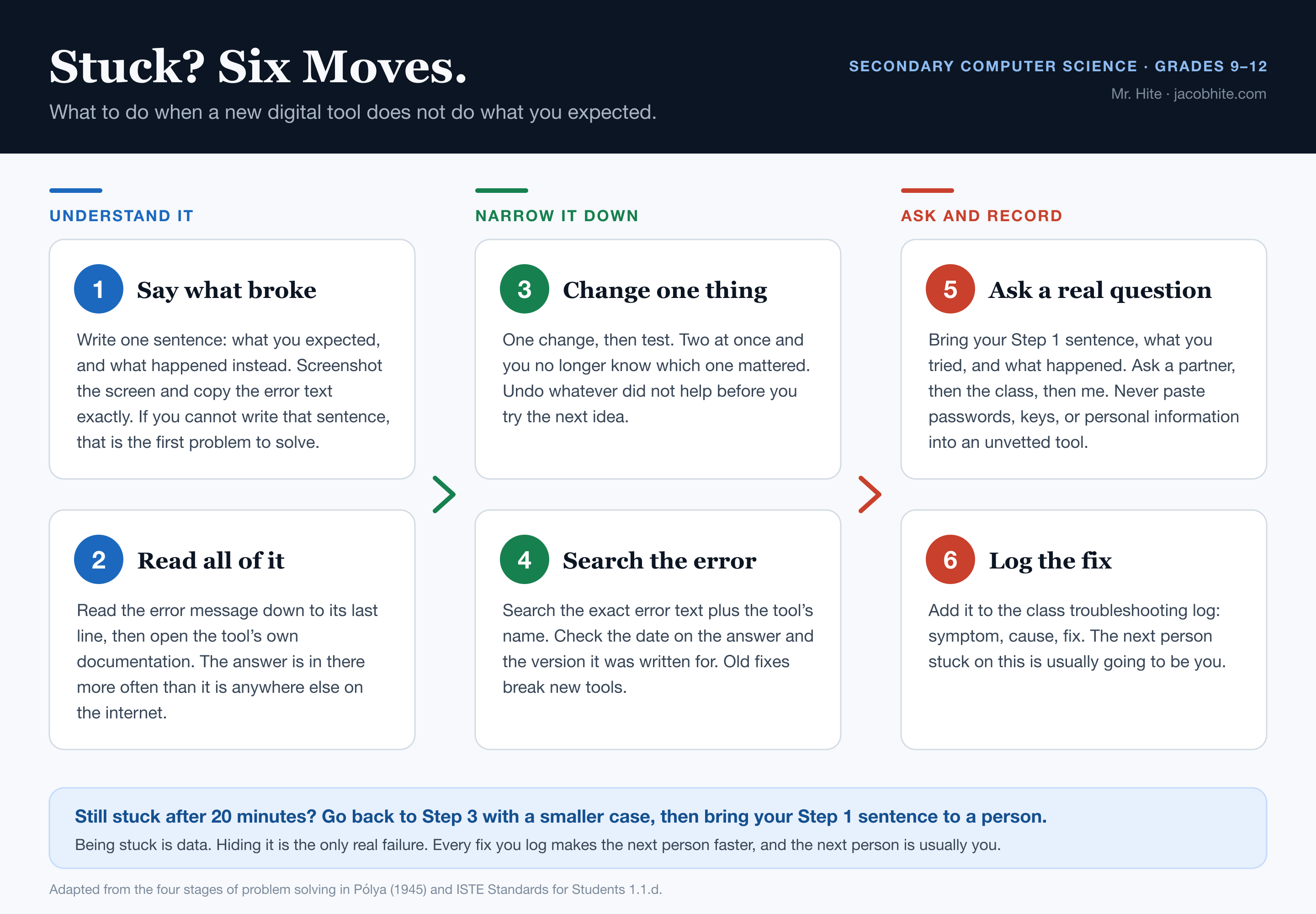
Download the original file (.svg, 10 KB) →
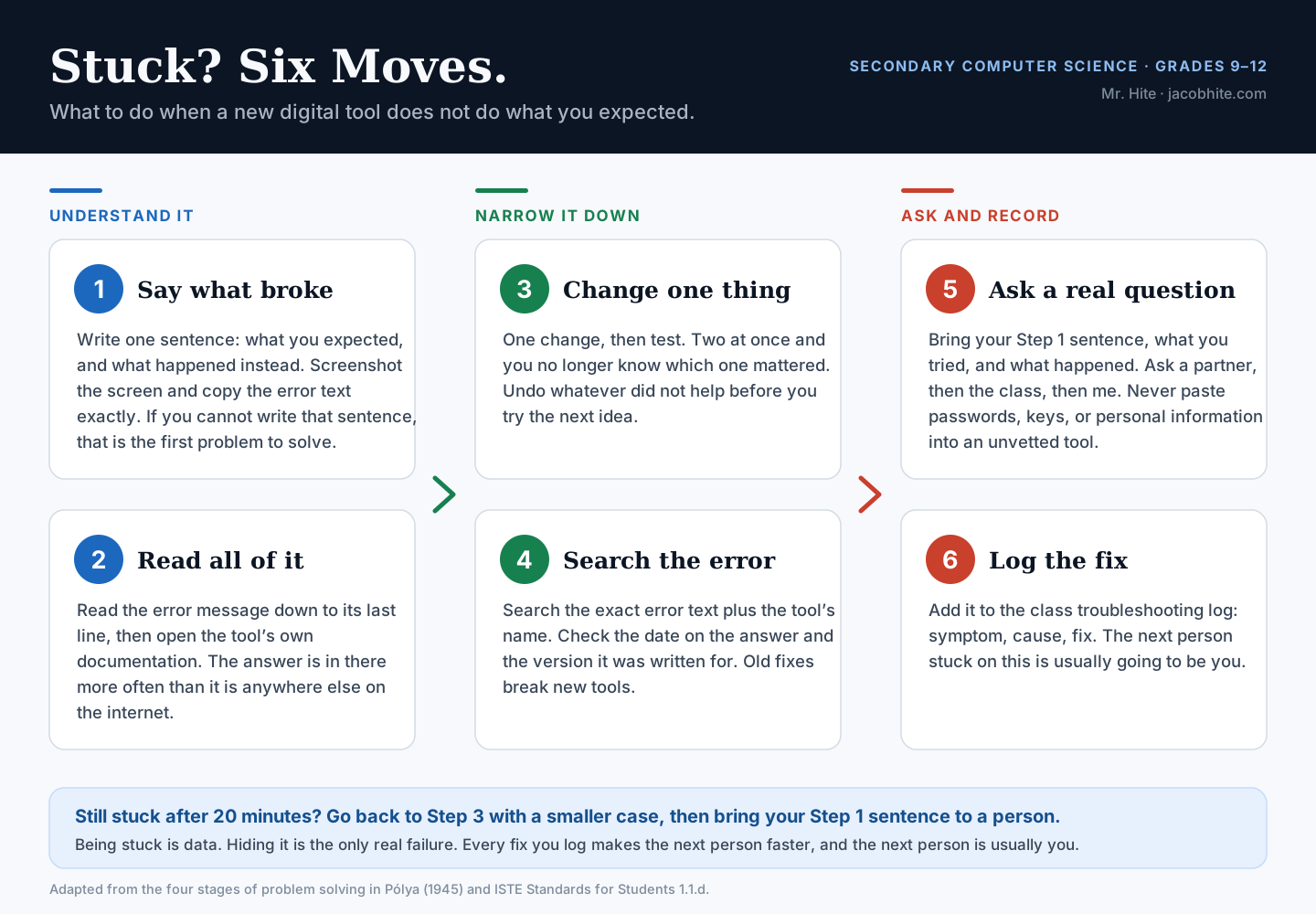
Around the poster will sit four classroom routines.
- The stuck note is the price of asking. Before a student asks anyone, including me, they write down what they expected, what happened, and what they have already tried. Writing that note solves the problem outright often enough to be worth the friction, which is rubber duck debugging under a different name (Hunt & Thomas, 1999).
- Ask a partner, then the class, then me, and no more than twenty minutes alone before the first of those. Being stuck is normal. Being stuck in silence for a period is a routine failure, not a character one.
- A class troubleshooting log, symptom, cause and fix, that everyone can write to. It turns a solved problem into a shared artifact and gives step 6 a reason to exist.
- I will grade the process, not just the fix. The stuck note and the log entry get assessed. A student who documented a failure they never solved has done the work I actually care about.
The one thing I will not do is take the keyboard and fix it at the board. That resolves the problem and teaches that the teacher is the debugger.
Reflection: would I use this in my classroom?
Yes, under four conditions, and the conditions carry more of the answer than the yes does.
- AI is allowed and disclosed, never hidden. Disclosure will be a line in the commit message: what I asked for, and what I changed afterward. Hidden use is the thing I am against, not use.
- Assessment moves to what the model cannot do for you. Explaining generated code line by line out loud, writing tests that challenge the requirement rather than confirm the implementation, and defending the design in conversation.
- There will be deliberately unassisted stretches. Not because assistance is cheating, but because the fluency you need to supervise the model is built by working without it, which is the Bainbridge point turned into a schedule.
- The privacy floor is not negotiable, and neither is the guidance around all of this. Kirschner et al. (2006) is my reason for not simply turning students loose with a powerful tool and trusting discovery to do the rest.
That is where I draw my own line, and I will say so to the class rather than pretend the rule came down from somewhere. I do not read the compiler. I do read every line the model writes for me, because when it is wrong at two in the morning, it is my name on it. The U.S. Department of Education’s (2023) framing is the one I keep returning to: keep humans in the loop, and design the classroom so that staying in the loop is the easy path.
And the honest answer to my own question, where each person draws the line, is that it moves. It moves with what you are responsible for. A student writing a toy program can afford an ignorance I cannot afford shipping a login form. Teaching that the line moves, and teaching students to notice when it has moved under them, is worth more than any fixed policy I could hand out.
Unit 3, Activity 2: Incorporating the ISTE Standards
The International Society for Technology in Education (ISTE) is the leading body for setting standards on using technology in schools. It maintains 26 standards across four groups — students, teachers, education leaders, and technology coaches — and sets them in parallel so the groups work in concert across a school community (iCEV, n.d.). This activity takes the seven ISTE Standards for Teachers and asks for an honest self-rating against each, 1 to 5, with a reflection on how it affects students. The one-line summary under each standard’s name is iCEV’s (n.d.); the ratings and reflections are mine, with the specific indicators each reflection evidences named inline.
Learner
Setting professional goals, pursuing professional learning networks, and keeping current with research on student learning.
My entire career has been never-ending learning due to ever-changing technology. I’m still learning each and every day as things evolve. I believe this brings me closer to the students’ learning perspective in many ways.
I’ve been embedded in peer networks like Stack Overflow and open-source contributions on GitHub that keep me current (ISTE 2.1a Set Professional Goals, 2.1b Participate in PLNs, 2.1c Keep Current on Research). Concretely and more recently, that means a structured self-study path across AI tooling — evaluating different AI offerings between companies like OpenAI and Anthropic, and their specific models, like Claude’s Opus and Sonnet lines, for different coding and teaching tasks.
I’ve also looked into the open-source OpenClaw project to see how it is (was — a lot of its uniqueness has now been adopted by the larger AI companies) different from just using a chat AI bot.
Leader
Advancing a shared vision for learning with technology, advocating for equitable access, and demonstrating digital tools for colleagues.
I’ve done a lot to advance my own learning, but am only just growing my own wings as a leader in education. I’ve done some practice tutoring online to that end. Some lessons and students’ tracks hit well. Some don’t. It’s not total trial and error, but I am in the process of learning and improving. Students and I will have to grow together, and my own teaching mistakes can end up as lessons to all.
Where I do feel real movement is in modeling new tools rather than just talking about them. For example, reframing a student from a corporate/spreadsheet background as the “director of the build” who directs AI coding agents rather than hand-writing every line, bridging from something familiar (spreadsheets) to something new (databases, APIs) (ISTE 2.2c Model Digital Tool Use). This modeling has stayed student-facing rather than extending to peers, which is why a 3 still feels honest.
Citizen
Creating positive experiences online, evaluating resources for credibility, and modeling safe, legal, ethical practice with data.
As mentioned, I’ve participated in Stack Overflow, in both asking and answering questions, and in helping with open-source code on GitHub. I also try to model safe and ethical practices with student and user data directly in the products I build. For example, deliberately configuring session-replay privacy settings (masking sensitive fields) before enabling analytics tools on Owlonit, rather than defaulting to full capture (ISTE 2.3d Manage, Protect Data).
I make a point of teaching students to evaluate AI-generated output critically rather than accept it uncritically, since that’s now a core digital-literacy skill (ISTE 2.3b Evaluate Resources for Credibility).
Collaborator
Building learning experiences with colleagues, learning alongside students, and employing collaborative tools.
I’ve done some collaboration with students in crafting custom curriculum and letting them lead lessons where the questions land. I try to turn questions into challenges the students and I solve together. This shows up concretely in one-on-one tutoring — for instance, working with a student building a real-estate deal-management app, where we’re genuinely discovering the right architecture together rather than me dictating it (ISTE 2.4b Learn Alongside Students).
I also lean on collaborative, cloud-based tools so we can work inside the same artifact in real time rather than trading files back and forth (ISTE 2.4c Use Collaborative Tools). I’d like to grow this into more structured peer/colleague collaboration, which is the main gap keeping this at a 3.
Designer
Accommodating learner differences, designing standards-aligned activities with technology, and creating innovative learning environments.
This is where I think my strongest work happens.
I intentionally personalize instruction around each student’s actual background rather than a fixed curriculum. For example, with a student coming from a corporate/spreadsheet background rather than CS, I rebuilt the entry point to systems concepts around analogies that were already familiar to her (spreadsheets → databases, formulas → APIs) instead of starting from unfamiliar CS vocabulary (ISTE 2.5a Accommodate Learner Differences).
I also try to keep learning activities authentic rather than toy exercises, having students build and ship something real (a task-management workflow, a real-estate deal tracker) so the technology use is in service of an actual outcome, not a simulation of one (ISTE 2.5b Design Authentic Learning Activities).
Facilitator
Fostering student ownership of learning, managing classroom technology use, and teaching design and computational thinking.
I try to hand over real ownership rather than just permission — in essence, positioning students as the “director” of their own build who directs AI coding agents, makes the architectural calls, and is accountable for the result, with me facilitating rather than driving (ISTE 2.6a Foster Student Ownership of Learning).
I also design learning around computational-thinking problems directly: for example, building a mock-interview problem around AST/expression trees for a student targeting ML engineering roles, so the practice is decomposition and pattern recognition, not just syntax recall (ISTE 2.6c Teach Computational and Design Thinking).
I’m rating this a 3 because I’m still better at 1:1 facilitation than at managing this kind of ownership across a group or classroom setting, which I haven’t yet had the chance to test.
Analyst
Offering alternative assessments, using technology for formative and summative assessment, and using data to guide progress.
Most of my assessment work has been building structured, criteria-based feedback rather than simple pass/fail grading — for example, writing multi-dimension scoring rubrics for mock technical interviews (covering things like depth of ownership, decision reasoning, and self-awareness under pressure) so a student gets specific, actionable feedback tied to a real competency rather than a single score (ISTE 2.7b Use Tech to Create Assessments). I use that feedback to adjust what we work on next (ISTE 2.7c Use Data to Guide Progress).
I haven’t yet built out more systematic, tech-based data collection across students, which is the main thing keeping this at a 3 rather than higher.
Professional learning goals
As per my certification area — my methods subject is Secondary Computer Sciences — meeting content-area standards for continued professional learning requires setting specific, measurable goals. These are two SMART professional learning goals, the steps I will take to reach them, and the learning network I am joining.
Goal 1. Complete Ed Donner’s “AI Engineer Agentic Track: The Complete Agent & MCP Course” on Udemy by the end of this quarter (December 2026), to deepen my practical understanding of agentic AI systems I can bring into computer science instruction.
Steps. I am currently enrolled and progressing through the 6-week, 8-project curriculum. I will block dedicated weekly study time, complete each week’s hands-on project, and after each week write a short reflection connecting that week’s concepts (e.g., tool calling, multi-agent orchestration, MCP) to a concrete classroom or tutoring application.
Goal 2. Attend one ISTE+ASCD professional-development webinar or session per quarter for the next year, to deepen my understanding of the pedagogical side of ed-tech integration, not just the technical side.
Steps. I will check ISTE+ASCD’s events page each quarter, register in advance, block calendar time to attend live or watch the recording, and take notes on how each session’s content could apply to my own teaching.
Learning network
I am joining Supabase’s official Discord community, a global technology community of developers building on Supabase — the backend platform I already use in my own AI product development (Owlonit). This gives me a genuine, ongoing global network of computer science and technology practitioners to learn from and contribute to, and a way to stay current with real-world backend and database practices I can translate into up-to-date, authentic CS instruction. In Module 8, I will identify how this network has impacted my practice.
References
Entries cited in the text above, plus the sources cited in the three recordings.
- Bainbridge, L. (1983). Ironies of automation. Automatica, 19(6), 775–779. https://doi.org/10.1016/0005-1098(83)90046-8
- Bloom, B. S. (1984). The 2 sigma problem: The search for methods of group instruction as effective as one-to-one tutoring. Educational Researcher, 13(6), 4–16. https://doi.org/10.3102/0013189X013006004
- Cárdenas-Hagan, E. (n.d.). Teaching English learners: The stages of second language acquisition [Video]. Reading Universe. https://www.youtube.com/watch?v=wX80JthFvGM
- Children's Online Privacy Protection Act, 15 U.S.C. §§ 6501–6506 (1998). https://www.law.cornell.edu/uscode/text/15/chapter-91
- ClickView Education. (n.d.). 10 evidence-based instructional strategies. https://www.clickvieweducation.com/blog/teaching-strategies/evidence-based-instructional-strategies
- Cloud, N. (n.d.). Using the native language as a resource [Video]. Colorín Colorado. https://www.colorincolorado.org/video/using-native-language-resourse
- Cummins, J. (2008). BICS and CALP: Empirical and theoretical status of the distinction. In B. Street & N. H. Hornberger (Eds.), Encyclopedia of language and education (2nd ed., Vol. 2, pp. 71–83). Springer. https://doi.org/10.1007/978-0-387-30424-3_36
- D'Souza, F. P., & Padmanabha, C. H. (2024). Krashen's second language acquisition, a theory or hypothesis: An analytical study. Journal on English Language Teaching, 14(3), 43–48. https://eric.ed.gov/?id=EJ1440740
- Family Educational Rights and Privacy Act, 20 U.S.C. § 1232g (1974). https://www.law.cornell.edu/uscode/text/20/1232g
- Fan, Y., Tang, L., Le, H., Shen, K., Tan, S., Zhao, Y., Shen, Y., Li, X., & Gašević, D. (2025). Beware of metacognitive laziness: Effects of generative artificial intelligence on learning motivation, processes, and performance. British Journal of Educational Technology, 56(2), 489–530. https://doi.org/10.1111/bjet.13544
- Genesee, F. (2012). The home language: An English language learner's most valuable resource. Colorín Colorado. https://www.colorincolorado.org/article/home-language-english-language-learners-most-valuable-resource
- Gregg, K. R. (1984). Krashen's monitor and Occam's razor. Applied Linguistics, 5(2), 79–100. https://doi.org/10.1093/applin/5.2.79
- Hunt, A., & Thomas, D. (1999). The pragmatic programmer: From journeyman to master. Addison-Wesley.
- iCEV. (n.d.). What are ISTE standards? (And why do they matter?) https://www.icevonline.com/blog/what-are-iste-standards
- International Society for Technology in Education. (n.d.-a). ISTE standards: For educators. https://iste.org/standards/educators
- International Society for Technology in Education. (n.d.-b). ISTE standards: For students. https://iste.org/standards/students
- Kirschner, P. A., Sweller, J., & Clark, R. E. (2006). Why minimal guidance during instruction does not work: An analysis of the failure of constructivist, discovery, problem-based, experiential, and inquiry-based teaching. Educational Psychologist, 41(2), 75–86. https://doi.org/10.1207/s15326985ep4102_1
- Lee, H.-P., Sarkar, A., Tankelevitch, L., Drosos, I., Rintel, S., Banks, R., & Wilson, N. (2025). The impact of generative AI on critical thinking: Self-reported reductions in cognitive effort and confidence effects from a survey of knowledge workers. In Proceedings of the 2025 CHI Conference on Human Factors in Computing Systems (Article 1121, pp. 1–22). Association for Computing Machinery. https://doi.org/10.1145/3706598.3713778
- Lee, L. (2019, August 8). Simple ways to integrate four evidence-based teaching strategies. Edutopia. https://www.edutopia.org/article/simple-ways-integrate-four-evidence-based-teaching-strategies/
- National Clearinghouse on Autism Evidence and Practice. (2020). Evidence-based practices. Frank Porter Graham Child Development Institute, University of North Carolina at Chapel Hill. https://autismpdc.fpg.unc.edu/ebps
- Norris, J. M., & Ortega, L. (2000). Effectiveness of L2 instruction: A research synthesis and quantitative meta-analysis. Language Learning, 50(3), 417–528. https://doi.org/10.1111/0023-8333.00136
- Pólya, G. (1945). How to solve it: A new aspect of mathematical method. Princeton University Press.
- Prather, J., Reeves, B. N., Leinonen, J., MacNeil, S., Randrianasolo, A. S., Becker, B. A., Kimmel, B., Wright, J., & Briggs, B. (2024). The widening gap: The benefits and harms of generative AI for novice programmers. In Proceedings of the 2024 ACM Conference on International Computing Education Research (Vol. 1, pp. 469–486). Association for Computing Machinery. https://doi.org/10.1145/3632620.3671116
- Privacy Technical Assistance Center. (2014, February). Protecting student privacy while using online educational services: Requirements and best practices. U.S. Department of Education. https://studentprivacy.ed.gov/sites/default/files/resource_document/file/Student%20Privacy%20and%20Online%20Educational%20Services%20(February%202014)_0.pdf
- Reading Rockets. (n.d.-a). Second language acquisition. https://www.readingrockets.org/topics/english-language-learners/articles/second-language-acquisition
- Reading Rockets. (n.d.-b). What is evidence-based instruction? https://www.readingrockets.org/classroom/evidence-based-instruction/what-is-evidence-based-instruction
- Regional Educational Laboratory Southeast. (2025, January). Evidence-based teaching practices [Infographic]. Institute of Education Sciences, U.S. Department of Education. https://ies.ed.gov/rel-southeast/2025/01/infographic-21
- Robertson, K., & Ford, K. (n.d.). Language acquisition: An overview. Colorín Colorado. https://www.colorincolorado.org/article/language-acquisition-overview
- Spolsky, J. (2002, November 11). The law of leaky abstractions. Joel on Software. https://www.joelonsoftware.com/2002/11/11/the-law-of-leaky-abstractions/
- Swain, M. (1985). Communicative competence: Some roles of comprehensible input and comprehensible output in its development. In S. Gass & C. Madden (Eds.), Input in second language acquisition (pp. 235–253). Newbury House.
- TeachHub. (2021, July). What is evidence-based instruction? https://www.teachhub.com/teaching-strategies/2021/07/what-is-evidence-based-instruction/
- U.S. Department of Education, Office of Educational Technology. (2023). Artificial intelligence and the future of teaching and learning: Insights and recommendations. https://www.ed.gov/sites/ed/files/documents/ai-report/ai-report.pdf
Also at /module/module-3-ed-503 on the Moreland site