Unit 1, Activity 1: Inspirations for teaching literacy
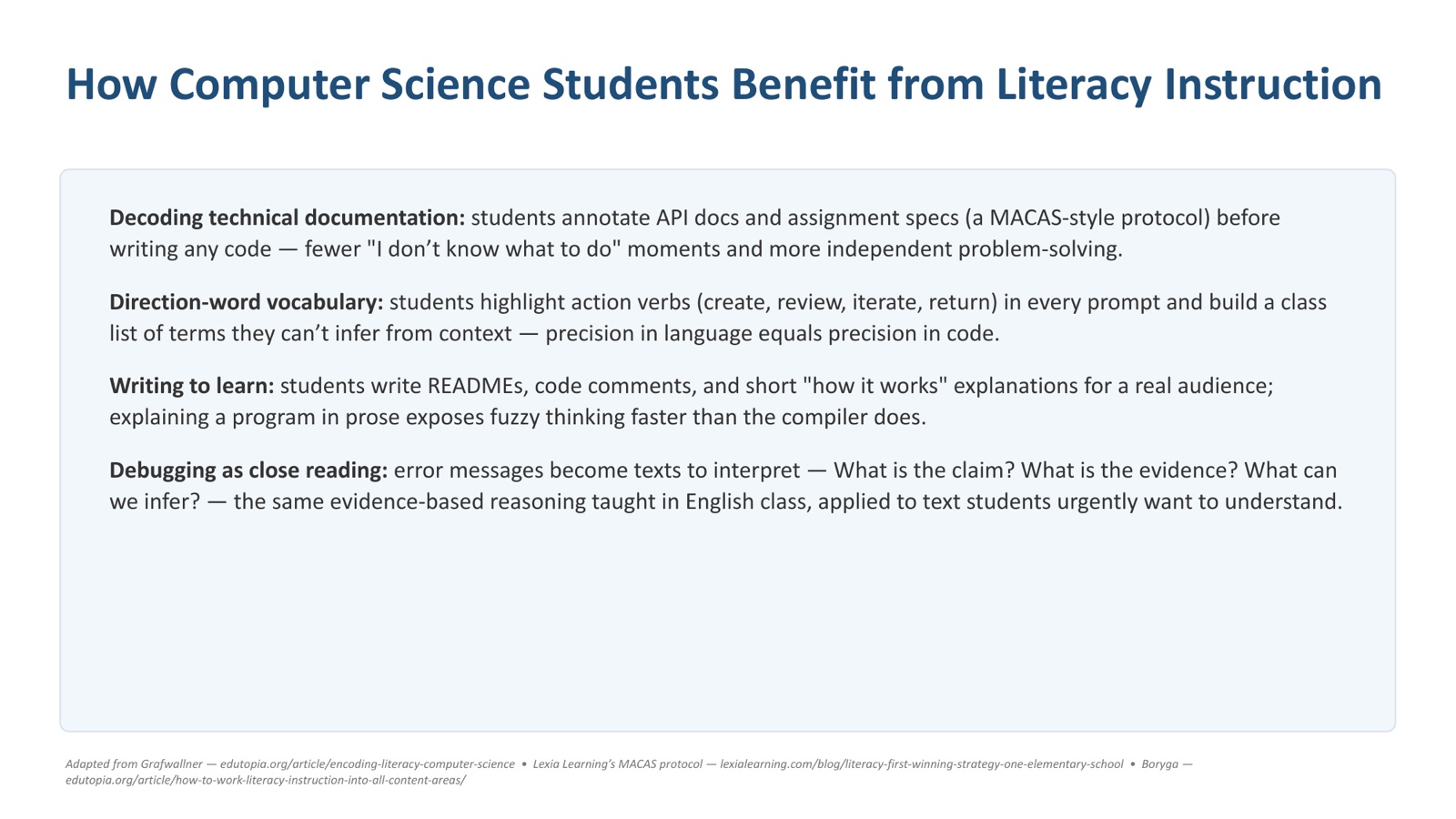
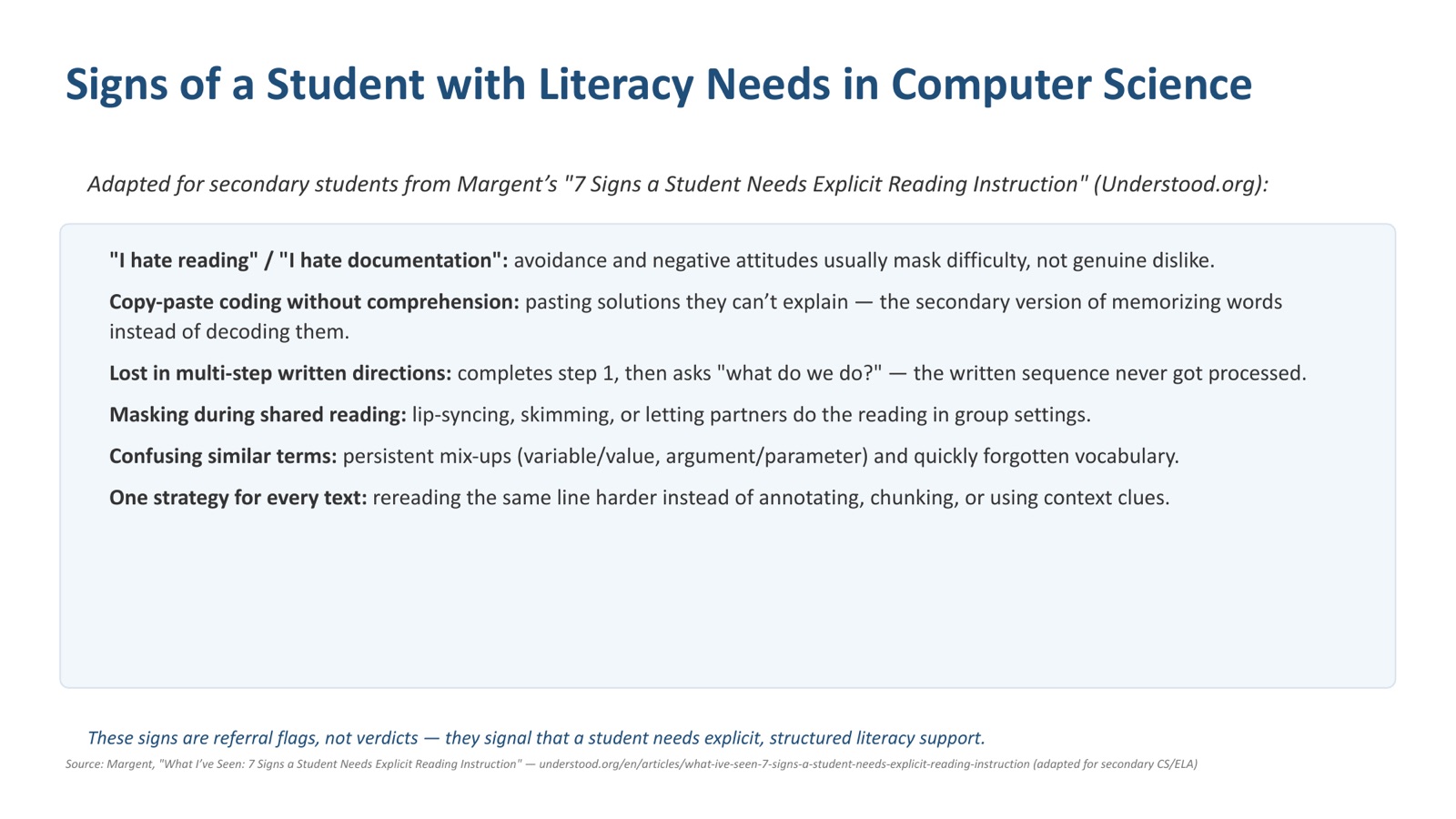
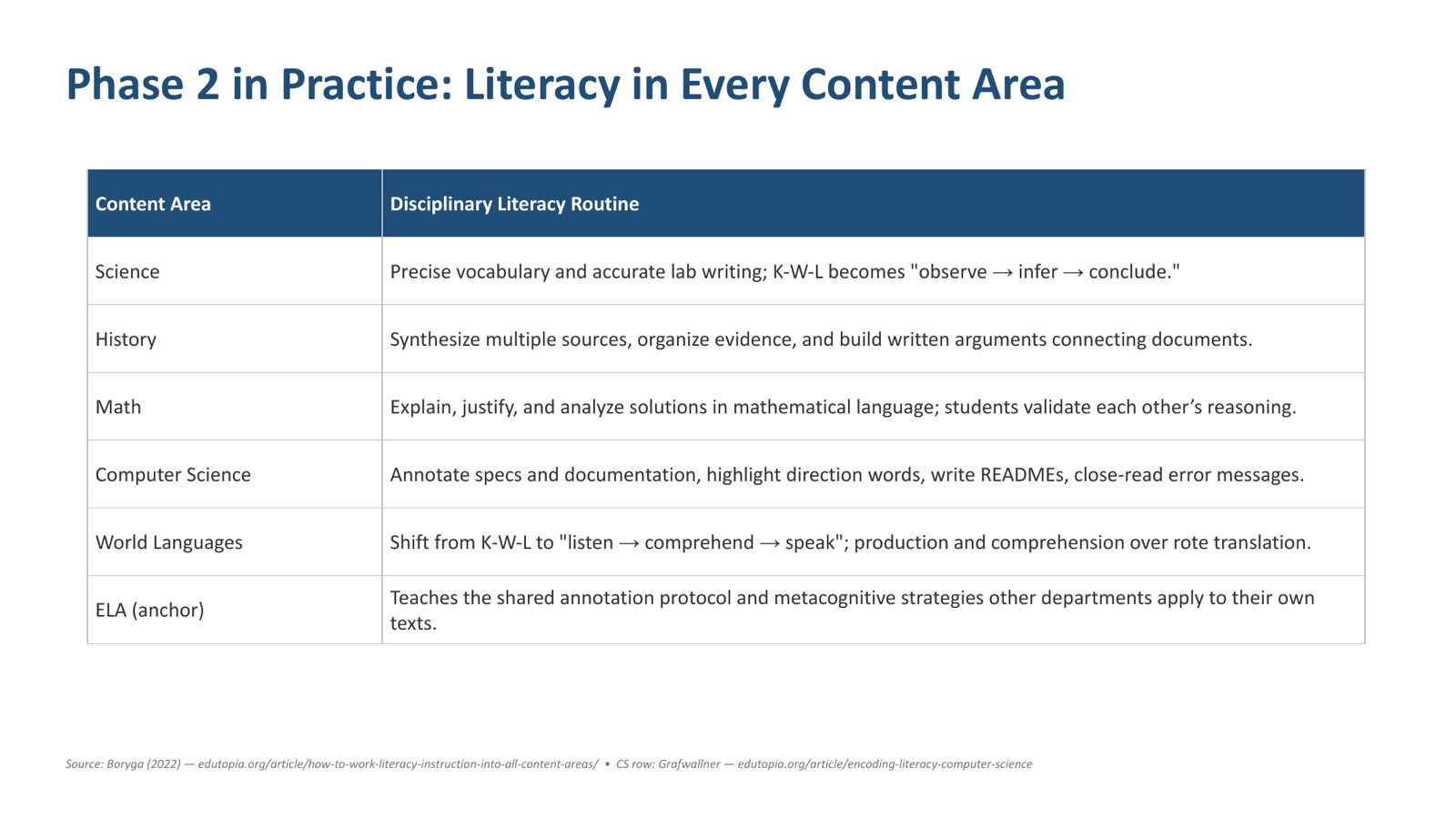
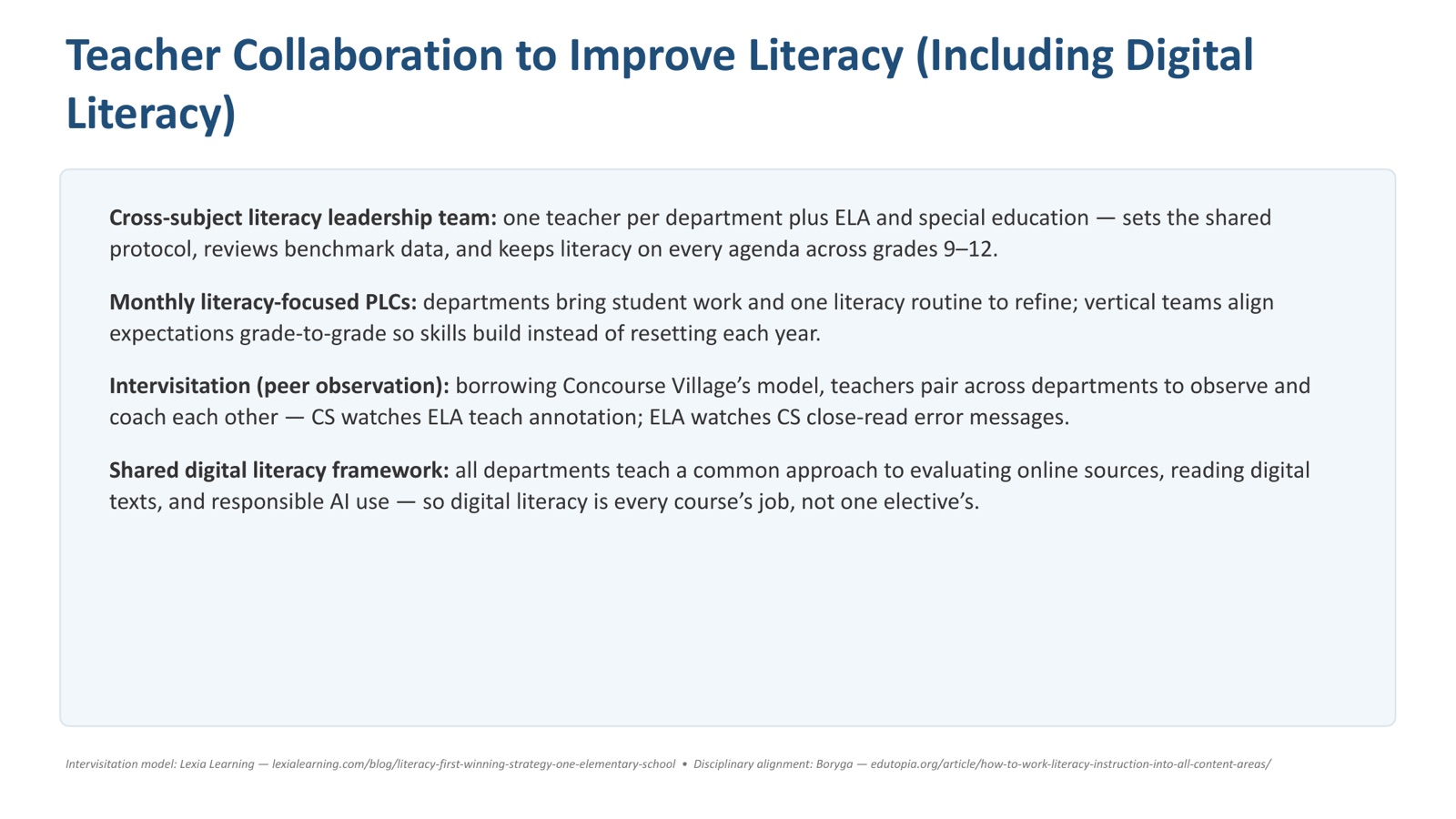
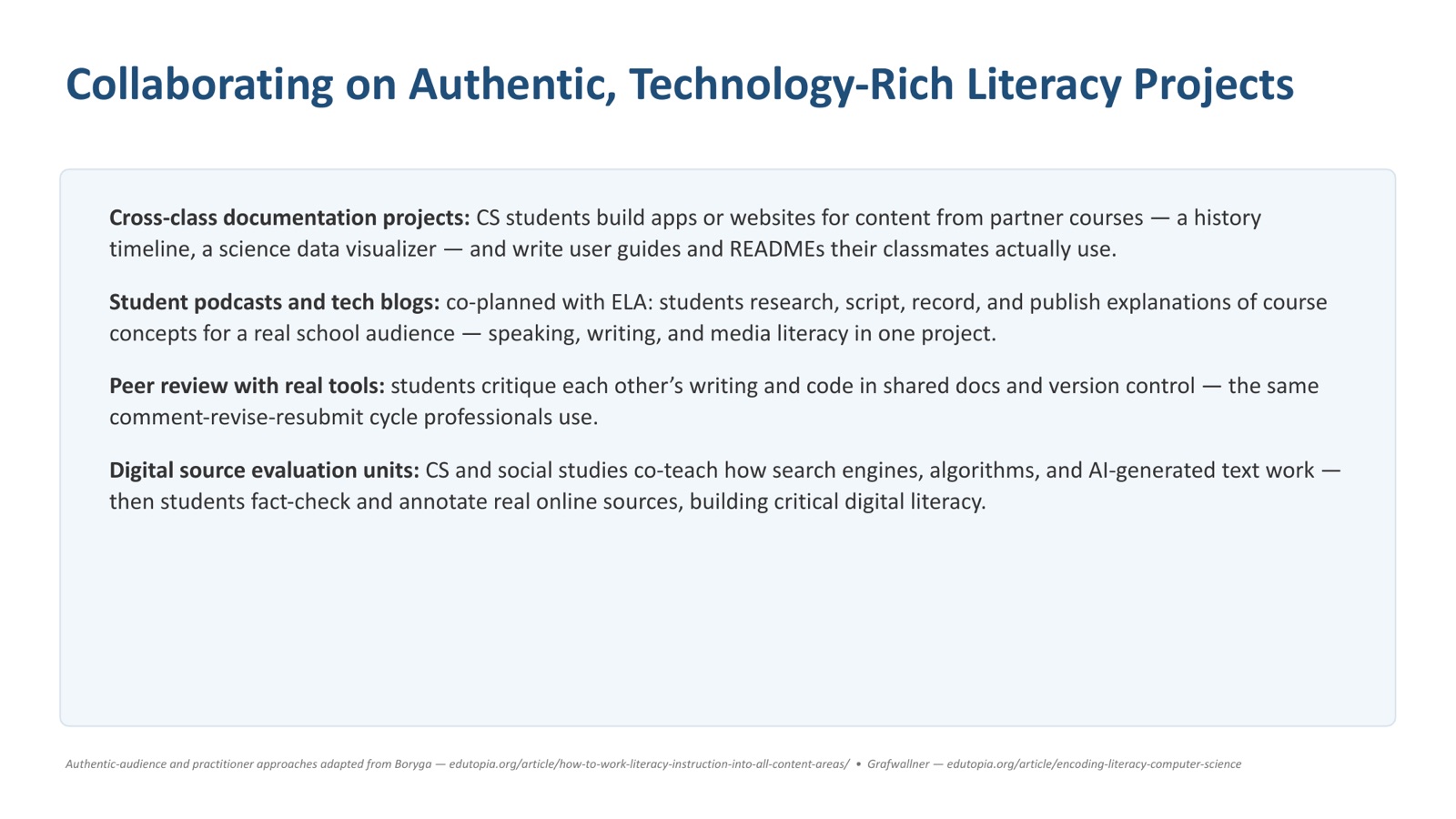
Literacy in a CS classroom works best when it is treated as disciplinary literacy rather than generic reading strategies imported from English lessons. Shanahan and Shanahan’s (2008) core argument is that experts in different fields read their texts in genuinely different ways, so the strategies have to be specific to how computer scientists read and write, not a one-size-fits-all “every teacher a teacher of reading.”
For computer science the texts are code, error messages, documentation, specifications and diagrams, and the reading practices are tracing, decomposition and abstraction. Concretely:
- A “predict” starter. Open the lesson with a five- to eight-line program on the board. Students write down what they think the output is before anyone runs it.
- Annotated code reading. Students mark up a printout, highlighting variables, control flow, and the points where state changes.
- Parsons problems. Scrambled lines of correct code to be reassembled (Parsons & Haden, 2006). They strip out the syntax burden and force attention onto structure and sequence, while exposing students only to well-written code.
- Line-by-line tracing tables. A column per variable, a row per iteration, run as a routine, not a one-off.
Unit 1, Activity 2: Laws and policies that affect teaching
I live and expect to teach in Thailand, so I researched the law that governs it there rather than one I would only ever read about.
Researching this changed what “the culture of schooling” means to me. The staffing pattern in an international-track Thai classroom (who is permanent, who is renewed annually, who sets the curriculum) is not an accident of any one school. It is what this law produces.
Unit 1, Activity 3: Teaching digital citizenship
Why teach digital citizenship?
There are a number of reasons to teach digital citizenship: online safety, being respectful of people with different viewpoints, telling fact from fiction online, using technology to engage in civil action, balancing time online and off, and knowing how to stay safe and how to make a space safe for others (ISTE, 2019).
AI belongs in that list now. It is advancing faster every day, and the ways the general public, students and professionals apply it are still expanding. Because the technology is moving so fast, our use of it in learning, from both the student’s side and the teacher’s, is still nascent. Teachers need to stay on top of it and start covering it more comprehensively as part of what digital citizenship means, and as part of what healthy, meaningful learning looks like.
Teaching what plagiarism is, and how to avoid it
I would start by defining it and giving concrete examples of what it looks like:
- copying and pasting from a source, online or off, without citing it
- paying someone to do your homework
- using AI to do the work outright, rather than to help you understand it
Then I would teach students how to properly cite, quote and use sources in their classroom work (MORKSENSEI, 2020). Then, and this is the part that actually changes behavior, why we would want to avoid it in the first place.
- Plagiarism hurts the student most of all. Copying skips the learning: the problem solving, the creativity of arriving at your own answer, and the chance to make mistakes and learn what mistakes are worth. Mistakes are not a bad thing. They are the growth opportunity.
- It hurts the teacher’s read on their own teaching. Plagiarized work makes it impossible to judge whether a concept landed, for that student or for the class.
- It distorts grading for everyone else. Plagiarized work is often taken from sources well beyond the level of the class, which moves the scale for students who did their own.
Secondary computer science
Socially responsible online behavior, and why students need practice. It means interacting in digital spaces in ways that respect the dignity, privacy and wellbeing of others, so that students feel safe voicing their ideas openly. It includes communicating respectfully in disagreement, protecting personal information, crediting other people’s work, thinking before sharing, and speaking up, or getting an adult, when witnessing cyberbullying. It is the digital extension of citizenship: behind every username is a real person, and online actions have real consequences.
Students need structured opportunities to practice these behaviors, not just hear about them, because digital citizenship is a skill, not a fact. Practicing in a supervised space builds habits that transfer to the rest of their digital lives.
Discord as the safe community platform. A teacher-administered private server can be configured for safety: invite-only access, teacher-held moderator permissions, member-to-member direct messages disabled, and separate channels for coursework, collaboration and casual community-building. Quieter students can participate in writing rather than by speaking up in class, and the persistent chat history lets the teacher monitor interactions and address problems early.
- Example activity 1: co-authoring the community guidelines. Before the server goes live, students draft its rules in small groups: what respectful disagreement looks like, how to critique a classmate’s code without belittling them, what to do when someone posts something hurtful. The class negotiates a final version and pins it as a living document they agreed to, rather than rules imposed on them, which makes the norms a shared responsibility.
- Example activity 2: an introductions channel with structured responses. Once the
guidelines are pinned, students put them into practice immediately: everyone
posts a short introduction in
#introductionswith their name, an outside interest, and something they hope to build this year, following the norms the class just agreed on for what is appropriate to share in a semi-public space. Each student then replies warmly to at least two classmates they do not know well, with the guidelines as the standard for a respectful, welcoming response. Sequencing the two this way means students are not writing rules in the abstract; their first real interactions on the server are a live application of the community they defined, with the teacher modeling it by replying to every post.
Guiding safe, legal and ethical use of online resources. I would build three habits.
- Attribution. Code is intellectual property, so copying from Stack Overflow without citation is plagiarism. Students cite sources in code comments and use properly licensed media.
- Verification. Wikipedia is a starting point, not an endpoint. Claims get traced to a source and cross-checked.
- Disclosure. AI may be used to explain a concept or an error, but all assistance must be disclosed, and submitting AI-generated code as your own is academic dishonesty. AI can be confidently wrong, so students must be able to explain every line they submit; if you cannot explain it, you do not get credit for it. And no personal information goes into an AI tool or a public forum.
Unit 2, Activity 1: Understanding language development
What is language development?
Language development is the process by which a person learns to understand, speak, read and write a language. It covers vocabulary, grammar, pronunciation, listening, and the ability to communicate effectively. It starts with sounds and gestures before it reaches words and sentences, and it carries cognitive, social and literacy development along with it (Raising Children Network, n.d.). Literacy is a primary outcome of that development rather than a separate subject bolted on afterward (Duff & Tomblin, 2018).
How does language development impact reading comprehension?
Comprehension depends on it. Students need vocabulary, grammatical knowledge and oral language before they can make connections across a text, infer what is not stated, and hold a complex argument together. Where those are strong, reading comprehension has something to stand on; where they are thin, decoding the words is not enough.
How do differences in languages impact literacy development?
Vocabulary, grammar, sentence structure and writing system all change how a student learns to read and write. Bilingual children compare their two languages as they learn, which builds a deeper understanding of both, and they can hold an advantage over monolingual peers on some reading skills, because orthographic, phonological and semantic skills transfer between languages rather than competing for space (Mathers, 2020).
How do you assess your students’ literacy levels?
With more than one measure, because no single one sees the whole picture:
- Running records, for reading accuracy, fluency and comprehension.
- Screening and diagnostic assessments, for phonics, vocabulary and comprehension: screening to find who needs a closer look, diagnostics to find what specifically is missing (Foorman et al., 2016).
- Writing samples, for writing, spelling, grammar and organization.
- Classroom observation and student conferences, for reading behaviors, strategy use and engagement: the things a score does not report.
How can you differentiate instruction to meet diverse literacy needs?
By adapting content, method and activity to the individual student rather than lowering the goal (Tomlinson, 2017). In practice: texts at a range of reading levels; flexible small groups formed from assessment data rather than fixed ability tiers; vocabulary, phonics and comprehension strategies taught explicitly instead of left to be absorbed; visual supports, graphic organizers and multimedia where they carry meaning; and assignments that give more than one way to demonstrate the same learning.
Unit 2, Activity 2: Promoting literacy, language development
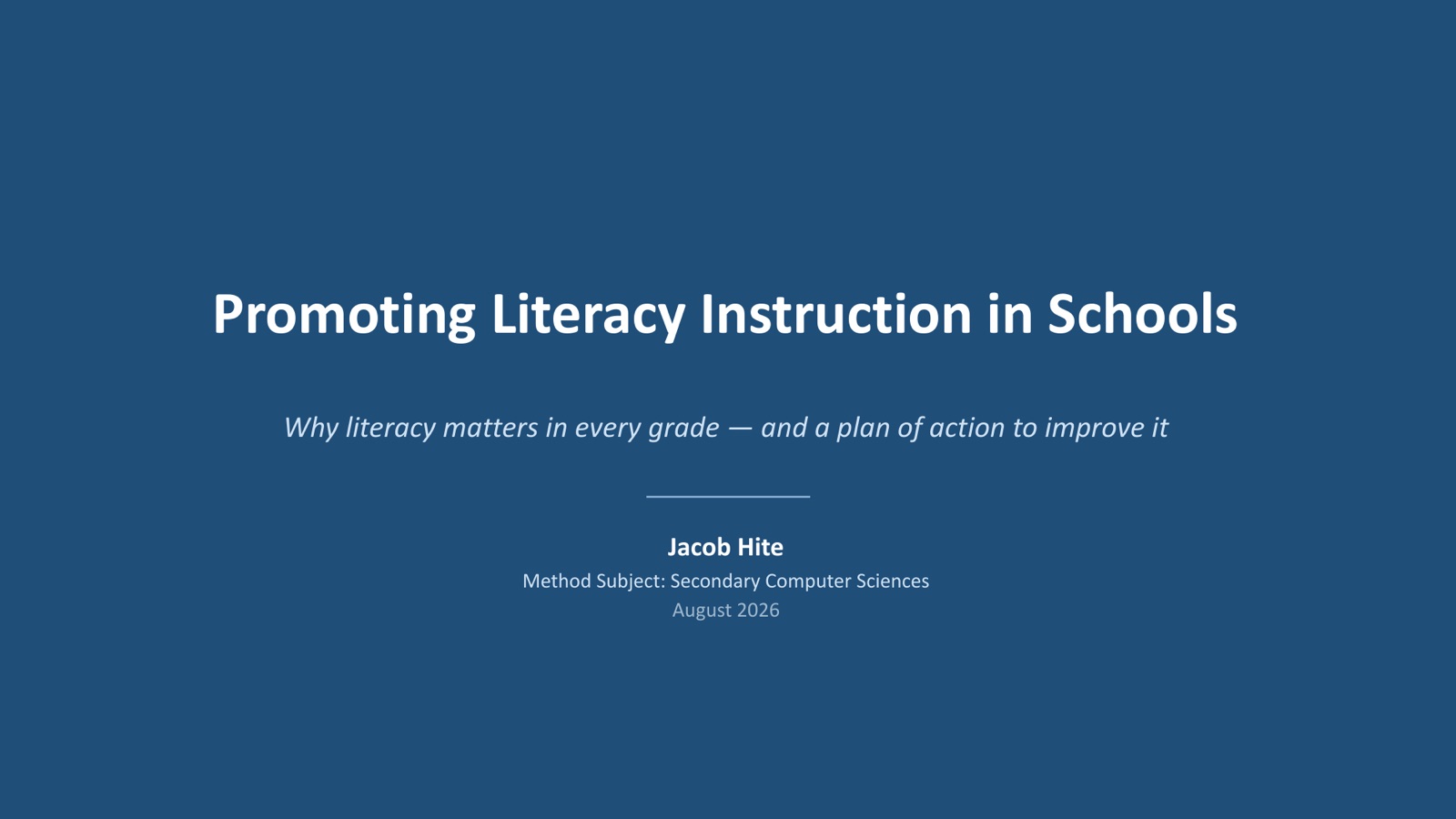
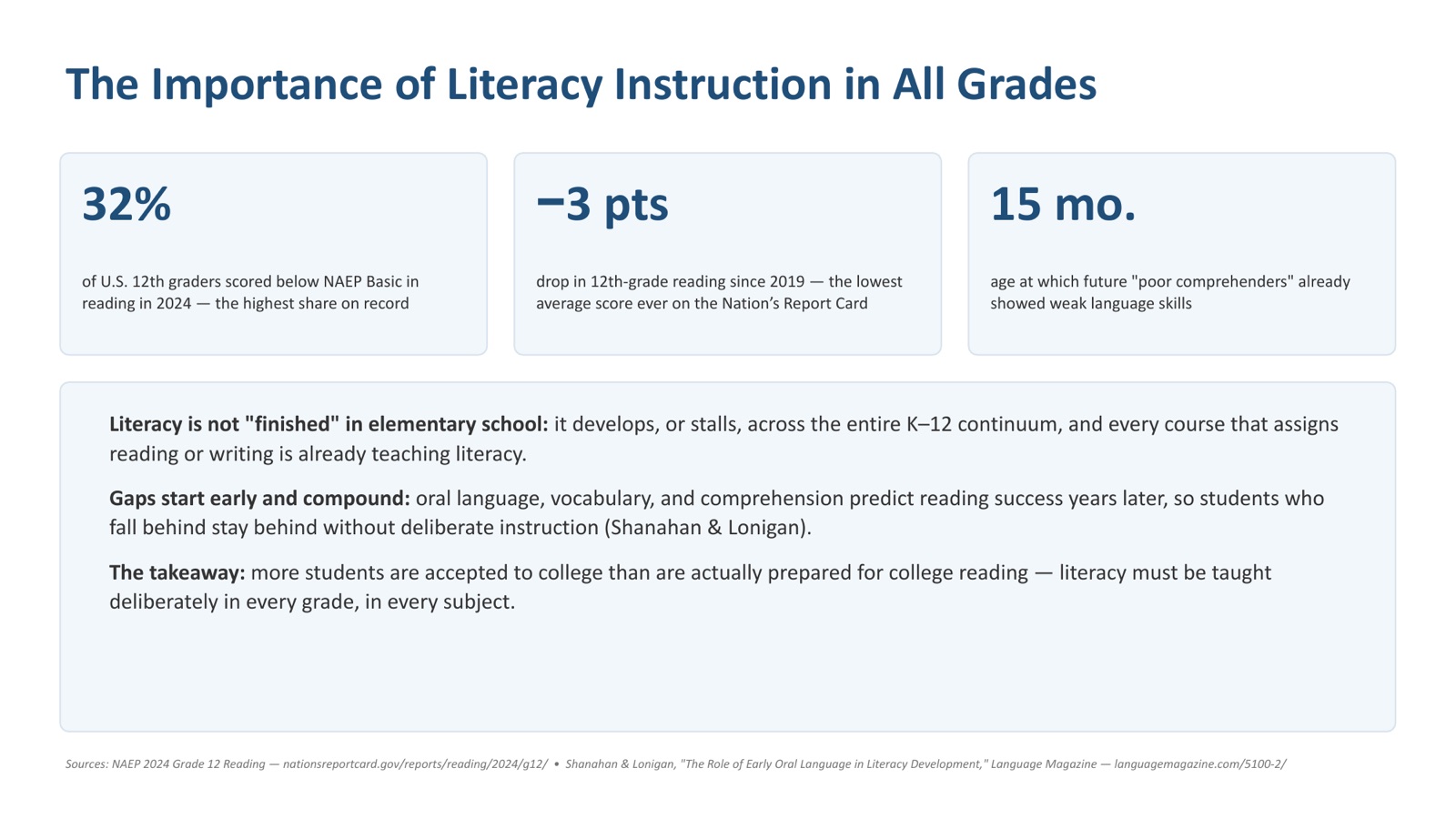
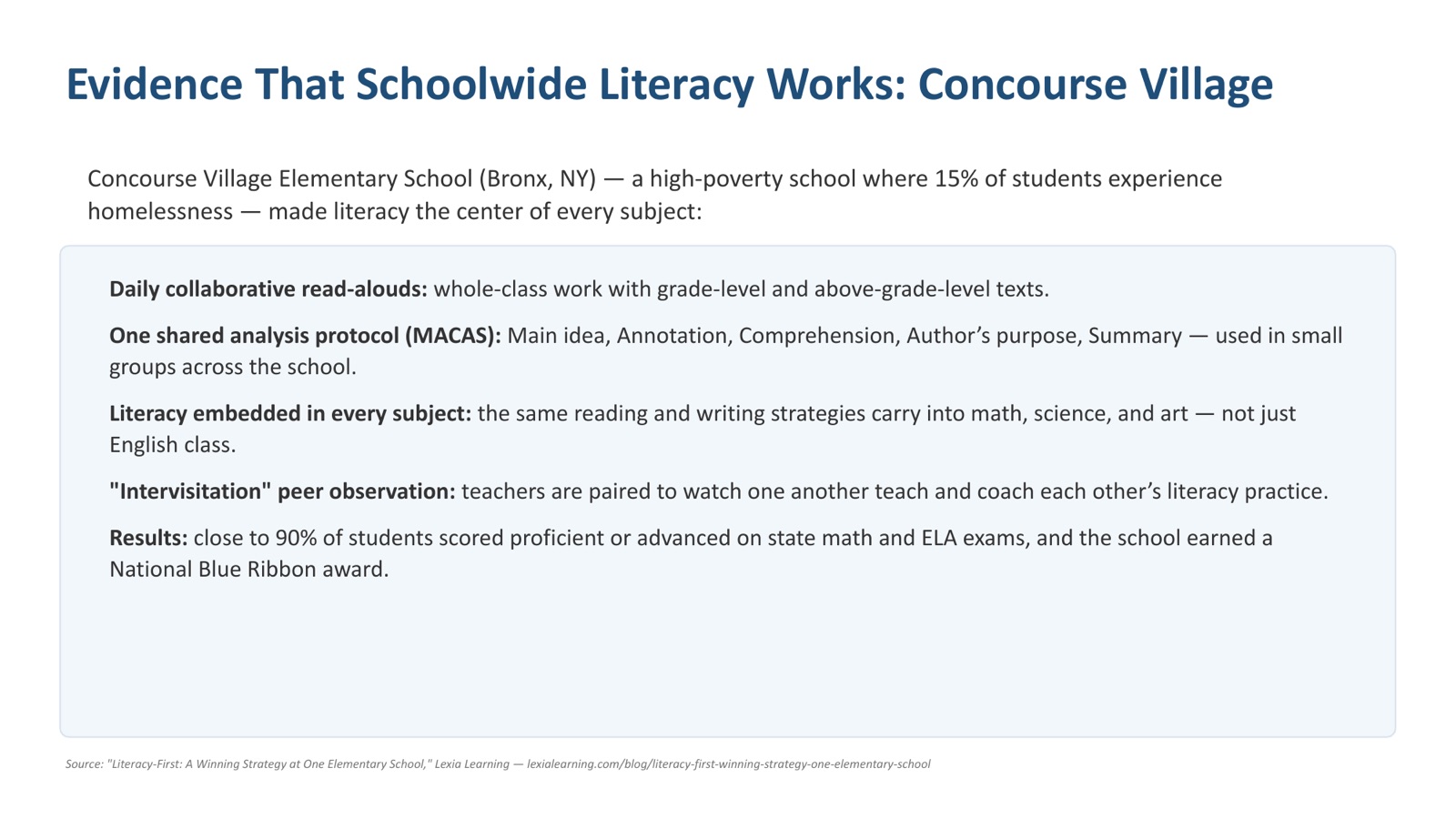
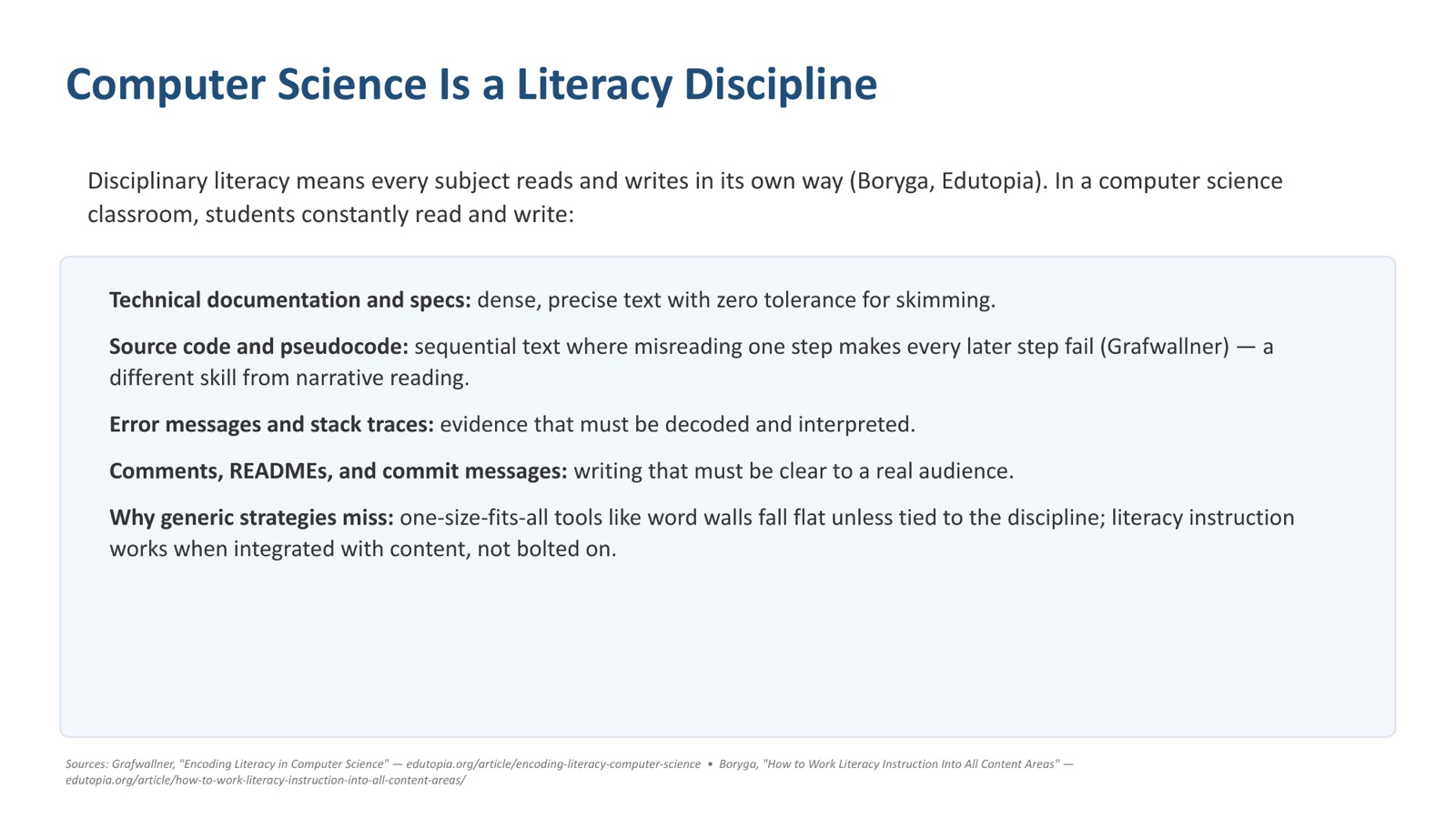
Unit 2, Activity 3: Promoting literacy, writing development
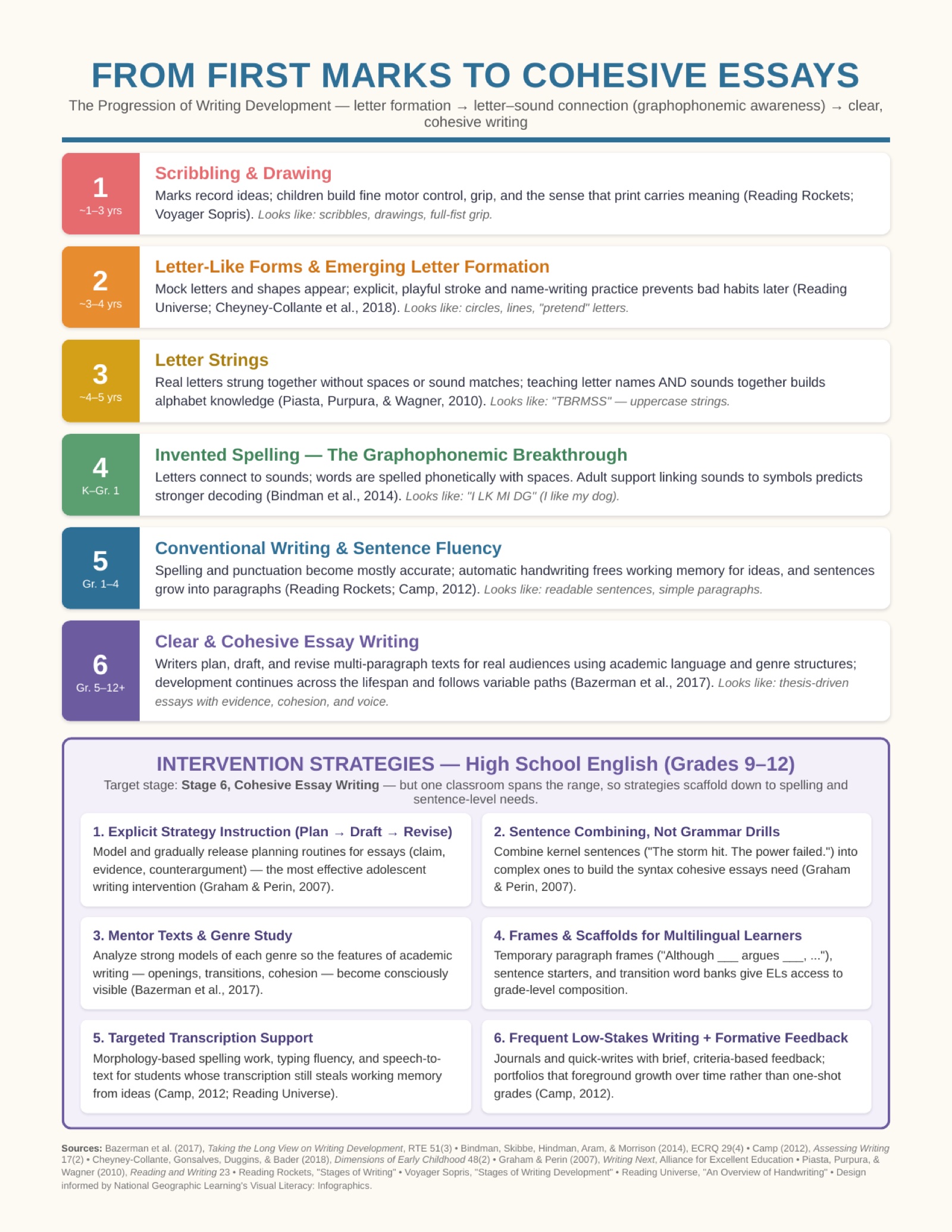
Unit 3, Activity 1: Multilingual students and students with learning differences
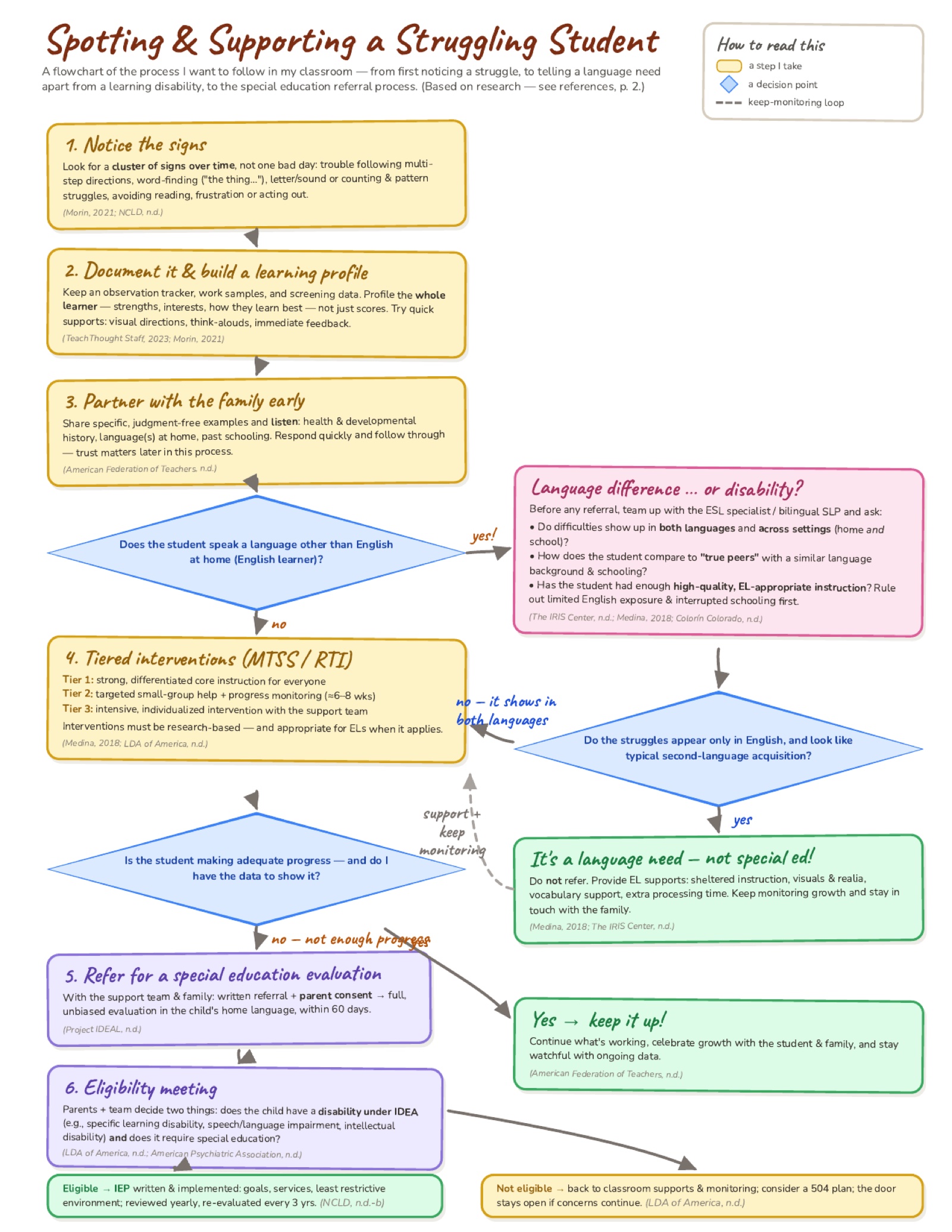
Unit 3, Activity 2: Assistive technologies for intervention
Working as a cohort in the live virtual classroom, we built a shared resource of assistive technologies and accommodations for struggling students across each of the fourteen IDEA disability categories, citing every source we drew on.
A note on the link below. Like the Literacy Guide, this is a collaborative cohort document; each category was researched and written up by a different cohort member, under their own name. It stays behind Moreland’s access controls.
This activity is carried over from /module/module-2-ed-502 on the Moreland site
Unit 3, Activity 3: Literacy Guide development within the e-portfolio
Across the program the cohort builds a shared Literacy Guide, organized by module with terms listed alphabetically, each member defining the terms for the module currently in session. It has one home on this site: the Literacy page.
References
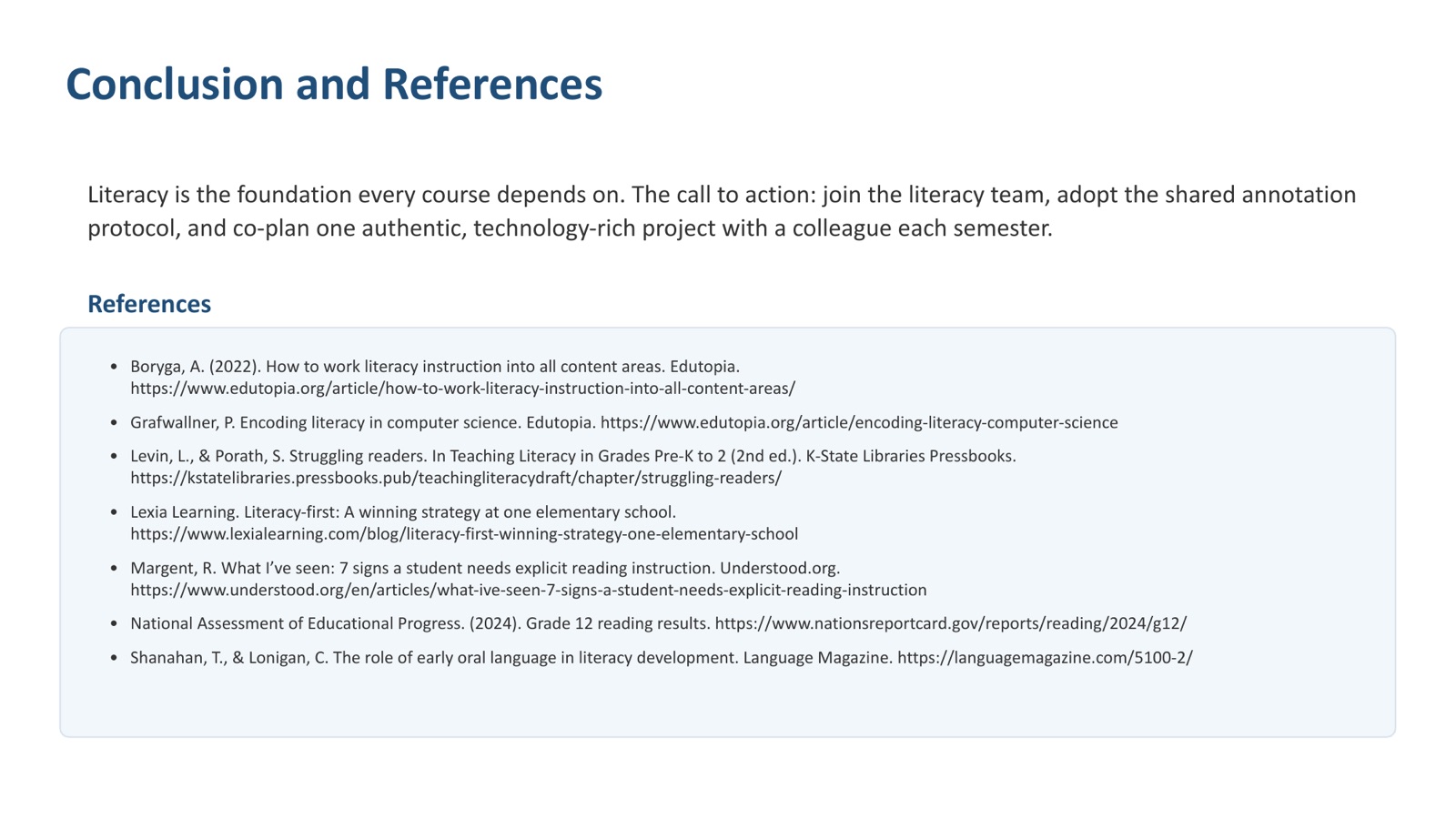
Entries cited in the text above, plus the sources cited on the presentation slides, the writing infographic and the referral flowchart.
- American Federation of Teachers. (n.d.). Building parent-teacher relationships. Reading Rockets. https://www.readingrockets.org/topics/parentengagement/articles/building-parent-teacher-relationships
- American Psychiatric Association. (n.d.). What is intellectual disability? https://www.psychiatry.org/patients-families/intellectual-disability/what-is-intellectual-disability
- Applebee, A. N., Bazerman, C., Berninger, V. W., Brandt, D., Graham, S., Matsuda, P. K., Murphy, S., Rowe, D. W., & Schleppegrell, M. (2017). Taking the long view on writing development. Research in the Teaching of English, 51(3), 351–360.
- Bindman, S. W., Skibbe, L. E., Hindman, A. H., Aram, D., & Morrison, F. J. (2014). Parental writing support and preschoolers' early literacy, language, and fine motor skills. Early Childhood Research Quarterly, 29(4), 614–624.
- Boryga, A. (2022). How to work literacy instruction into all content areas. Edutopia. https://www.edutopia.org/article/how-to-work-literacy-instruction-into-all-content-areas/
- Camp, H. (2012). The psychology of writing development—And its implications for assessment. Assessing Writing, 17(2), 92–105.
- Cheyney-Collante, K., Gonsalves, V., Duggins, S. E., & Bader, J. (2020). A misunderstood fundamental: Developmentally appropriate strategies for letter formation practice in preschool. Dimensions of Early Childhood, 48(2), 18–23.
- Colorín Colorado. (n.d.). Learning disabilities in English language learners. https://www.colorincolorado.org/article/learning-disabilities-english-language-learners-0
- Duff, D., & Tomblin, J. B. (2018, October). Literacy as an outcome of language development and its impact on children's psychosocial and emotional development. Encyclopedia on Early Childhood Development. https://www.child-encyclopedia.com/language-development-and-literacy/according-experts/literacy-outcome-language-development-and-its
- Foorman, B., Beyler, N., Borradaile, K., Coyne, M., Denton, C. A., Dimino, J., Furgeson, J., Hayes, L., Henke, J., Justice, L., Keating, B., Lewis, W., Sattar, S., Streke, A., Wagner, R., & Wissel, S. (2016). Foundational skills to support reading for understanding in kindergarten through 3rd grade (NCEE 2016-4008). National Center for Education Evaluation and Regional Assistance, Institute of Education Sciences, U.S. Department of Education.
- Grafwallner, P. (n.d.). Encoding literacy in computer science. Edutopia. https://www.edutopia.org/article/encoding-literacy-computer-science
- Graham, S., & Perin, D. (2007). Writing next: Effective strategies to improve writing of adolescents in middle and high schools. Alliance for Excellent Education.
- The IRIS Center. (n.d.). English learners with disabilities: Supporting young children in the classroom [Module]. Vanderbilt University. https://iris.peabody.vanderbilt.edu/module/dll/cresource/q1/p02/
- ISTE. (2019, August 27). Make digital citizenship about the do's, not the don'ts [Video]. YouTube. https://www.youtube.com/watch?v=tZeNr1q5QTU
- Learning Disabilities Association of America. (n.d.). Eligibility: Determining whether a child is eligible for special education services. https://ldaamerica.org/info/eligibility-determining-whether-a-child-is-eligible-for-special-education-services/
- Levin, L., & Porath, S. (n.d.). Struggling readers. In Teaching literacy in grades pre-K to 2 (2nd ed.). K-State Libraries Pressbooks. https://kstatelibraries.pressbooks.pub/teachingliteracydraft/chapter/struggling-readers/
- Lexia Learning. (n.d.). Literacy-first: A winning strategy at one elementary school. https://www.lexialearning.com/blog/literacy-first-winning-strategy-one-elementary-school
- Margent, R. (n.d.). What I've seen: 7 signs a student needs explicit reading instruction. Understood. https://www.understood.org/en/articles/what-ive-seen-7-signs-a-student-needs-explicit-reading-instruction
- Mathers, C. (2020, October 30). Bilingualism and literacy development. Bilingualism Matters, University of Edinburgh. https://www.bilingualism-matters.ppls.ed.ac.uk/bilingualism-and-literacy-development/
- Medina, T. J. (2018). Language difference or language disorder? English learners and special education. Mid-Atlantic Equity Consortium. https://platform-user-content.s3.us-west-2.amazonaws.com/activity_resources/Exploring-Equity-Language-Difference-or-Language-Disorder.pdf
- Ministry of Education. (1999). National Education Act B.E. 2542 (1999). Royal Kingdom of Thailand.
- Ministry of Education. (2003). Teachers and Educational Personnel Council Act B.E. 2546 (2003). Royal Kingdom of Thailand.
- Morin, A. (2021, February 18). Recognizing signs of potential learning disabilities in preschool. Edutopia. https://www.edutopia.org/article/recognizing-signs-potential-learning-disabilities-preschool/
- MORKSENSEI. (2020, September 27). What is plagiarism & why is it wrong? [Video]. YouTube. https://www.youtube.com/watch?v=BXE0IczlIyM
- National Assessment of Educational Progress. (2024). Grade 12 reading results. https://www.nationsreportcard.gov/reports/reading/2024/g12/
- National Center for Learning Disabilities. (n.d.). What is an IEP? [Video]. YouTube. https://www.youtube.com/watch?v=q2XlAWcMAUk
- Parsons, D., & Haden, P. (2006). Parson's programming puzzles: A fun and effective learning tool for first programming courses. In D. Tolhurst & S. Mann (Eds.), Proceedings of the 8th Australasian Conference on Computing Education (Vol. 52, pp. 157–163). Australian Computer Society.
- Piasta, S. B., Purpura, D. J., & Wagner, R. K. (2010). Fostering alphabet knowledge development: A comparison of two instructional approaches. Reading and Writing, 23(6), 607–626.
- Project IDEAL. (n.d.). Special education referral process. Texas Council for Developmental Disabilities. https://www.projectidealonline.org/v/special-education-referral-process/
- Raising Children Network. (n.d.). Language development: 0–8 years. https://raisingchildren.net.au/babies/development/language-development/language-development-0-8
- Reading Rockets. (n.d.). Stages of writing. https://www.readingrockets.org/classroom/looking-writing/stages-writing
- Reading Universe. (n.d.). An overview of handwriting and letter formation. https://readinguniverse.org/skill-explainer/handwriting-spelling-typing/handwriting/an-overview-of-handwriting
- Shanahan, T., & Lonigan, C. (n.d.). The role of early oral language in literacy development. Language Magazine. https://languagemagazine.com/5100-2/
- Shanahan, T., & Shanahan, C. (2008). Teaching disciplinary literacy to adolescents: Rethinking content-area literacy. Harvard Educational Review, 78(1), 40–59. https://doi.org/10.17763/haer.78.1.v62444321p602101
- Teachers' Council of Thailand. (2022). Khurusapha regulation on professional licenses B.E. 2565.
- Teachers' Council of Thailand, Bureau of Professional License Registration. (2023). Permission to teach without a professional license.
- TeachThought Staff. (2023, March 11). Learning profiles: What great teachers know about their students. TeachThought. https://www.teachthought.com/pedagogy/learning-profiles/
- Tomlinson, C. A. (2017). How to differentiate instruction in academically diverse classrooms (3rd ed.). ASCD.
- Voyager Sopris Learning. (n.d.). What are the stages of writing development? https://www.voyagersopris.com/vsl/blog/stages-of-writing-development
Also at /module/module-2-ed-502 on the Moreland site